Windows XP
*** NOTE: Emtune is no longer developed to offer Windows XP compatibility ***
To setup the Ethernet on Windows XP ready for the ECU connection use the following steps.
- Select: Start Menu -> Control Panel -> Network Connections
- The below menu should be visible. Select "Local Area Connection"

- Select TCP/IP then click Properties

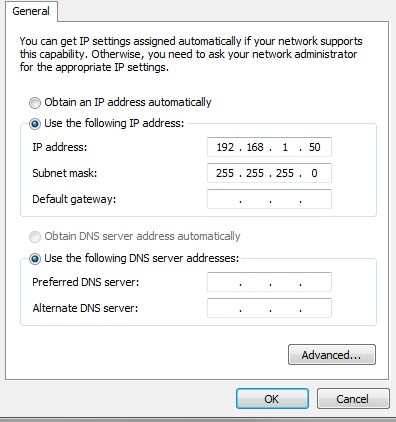
- Select "Use the following IP address" and enter in the address 192.168.1.50. The Subnet should automatically default to 255.255.255.0. Click OK.
- Done. Connect the Emtron Ethernet cable.